Automate WordPress Internal Links with AI Link Genius (A Review)
Internal linking is an indispensable part of content optimization. It is usually easy to carry out on a site with 50 or fewer posts, but as you count up to 100, 200, and above, you will find it cumbersome. It is not something you can scale manually, but with automated linking, it becomes possible to still link from your older content after you have published a new post.
Automated internal linking, or internal link management, helps in many ways. For instance, it helps you discover your internal linking profile, fix what is wrong, and strengthen pages.
We have a tool today to review. It is called AI Link Genius, and it is a module inside the Rank Math SEO plugin, which we all know as the best, the Swiss army knife of WordPress SEO.
Why do internal links matter?
Internal links are important from the perspective of SEO in so many ways.
In short, here are the benefits of internal linking:
- Guide users to relevant content on your site
- Increase dwell time and reduce bounce rate
- Help search crawlers navigate and index your content properly
- Pass link equity from stronger pages to weaker ones
- Highlight your most important pages to search engines
- Improve overall site structure and content flow
You can expand the reasons why internal links matter.
Why do we need to automate internal linking?
You can manage internal links manually when you have just a few posts. But once you get close to the 100–200 post range, you’ll begin to feel the weight.
In short, here is why automation is needed:
- It helps you scale internal linking across many posts
- It finds linking opportunities you would normally miss
- It keeps older content updated with new links
- It saves time compared to manual linking
- It helps you maintain a consistent linking structure
- It makes it easier to manage and fix internal linking issues
You can learn more about why internal linking automation is needed.
What is AI Link Genius?
AI Link Genius is an internal linking solution built right into the Rank Math plugin. It acts as a module, so it only comes into effect after you have activated it.
It helps you with internal linking to the point that you do not always need to go back to other content after releasing a new post. The tool packs a lot of features, and it is already competing with the best internal linking plugins.
The fact that it is built right into a plugin that already comes with tons of SEO features makes it a great option. It is also one that most people will have access to, because a huge number of WordPress users already use an SEO plugin.
Therefore, if you are deciding to automate your internal linking using a plugin, make sure you take a look at AI Link Genius if you already have Rank Math before exploring dedicated tools.
How to use AI Link Genius to automate internal linking?
Let’s now talk about automating internal linking using AI Link Genius. This guide will reveal all of its features and how to use it practically to help manage and speed up the process of internal linking. Let’s go.
Install Rank Math and turn on the Link Genius module
Most features of the Link Genius solution are not available in the free package. You need to get a Rank Math Pro subscription. Needless to say, when you are buying it, you are not just paying for Link Genius alone, but also for the tons of SEO features that Rank Math offers.
After subscribing to the paid plan, go to WordPress as usual, click Add New Plugin, then install and activate Rank Math on your site.
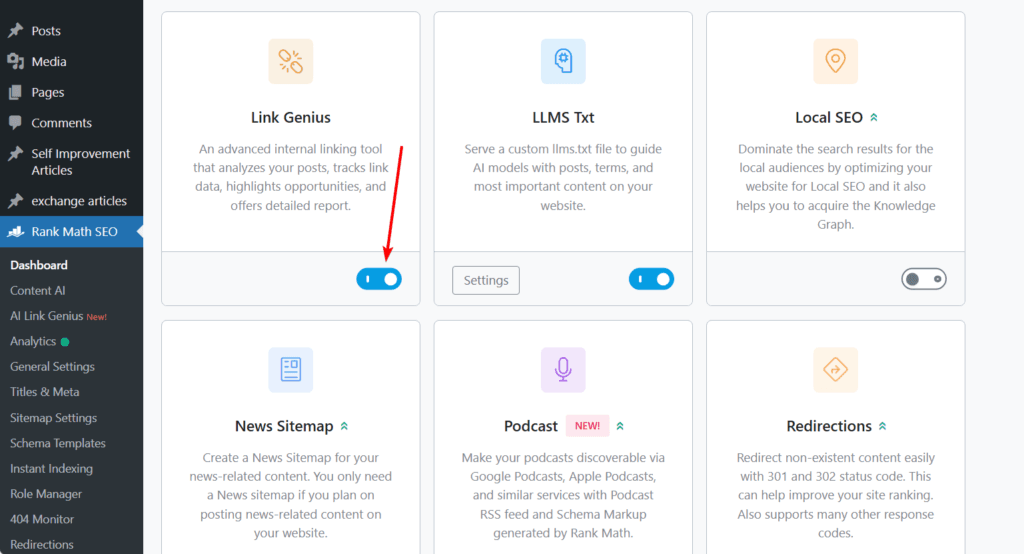
After that, go to the Rank Math SEO dashboard. Under Modules, scroll down until you find Link Genius, then turn it on. Once you do that, you are all set and ready to use the solution.
Refer to the dashboard for summarized reports
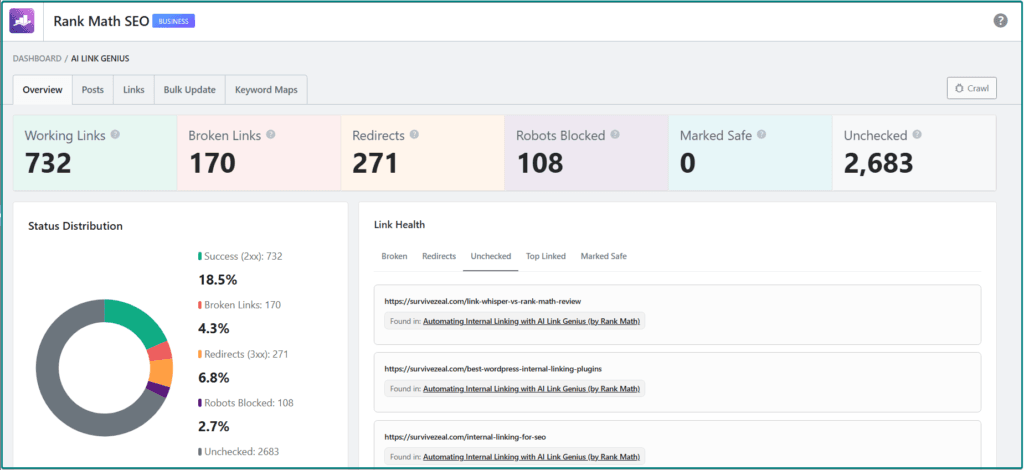
After activating the plugin on your site, you can then refer to the dashboard for summarized reports.
The Link Genius dashboard shows you link audit details. Once you activate the Link Genius module and run the link audit test, the tool visits all the links on your site one by one. This happens almost instantaneously.
It checks working links and hunts for broken links, redirected links, and links blocked by the robots.txt file. It is a great starting point because it quickly shows you the health of your linking profile.
Add internal links to your content (outbound link suggestions)
As you write or work on your content in WordPress, AI Link Genius shows two panels on the right-hand side of the WordPress editor. These panels are where it suggests internal linking opportunities for your content.
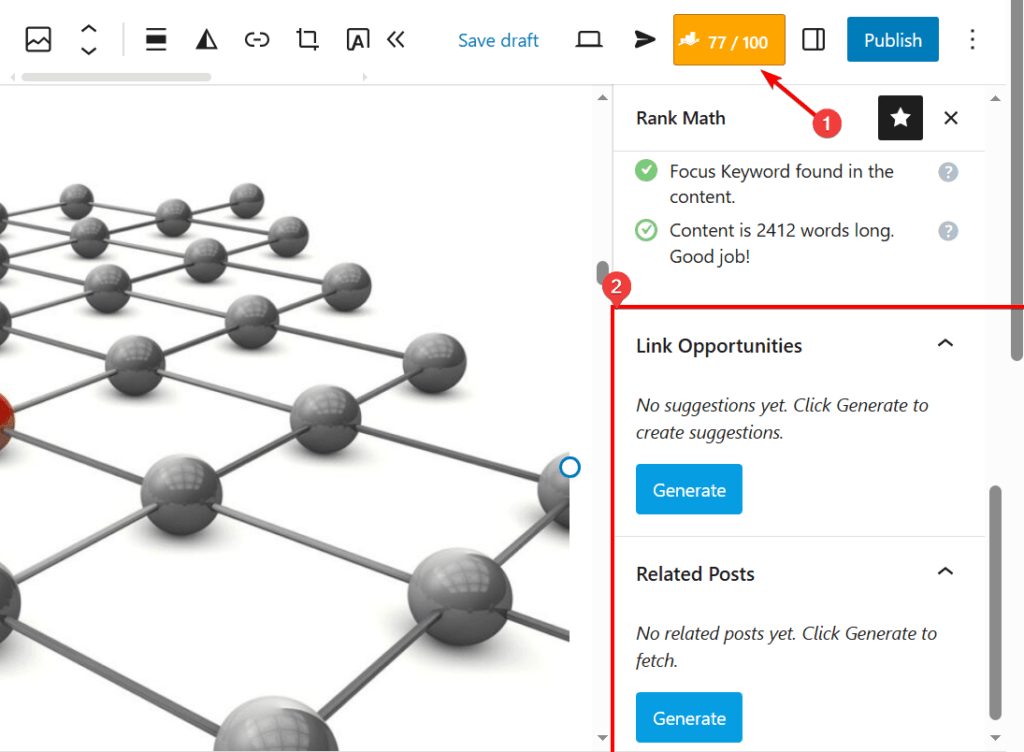
To access them, click the Rank Math icon at the top right corner. Then scroll down until you find the sections.
The first one is the Link Opportunities tool. This one tries to match relevant phrases in your content to relevant pages so you can link them easily. When you click the Generate button, the suggestions will appear, and you only need to review them and apply the ones you want with a click.
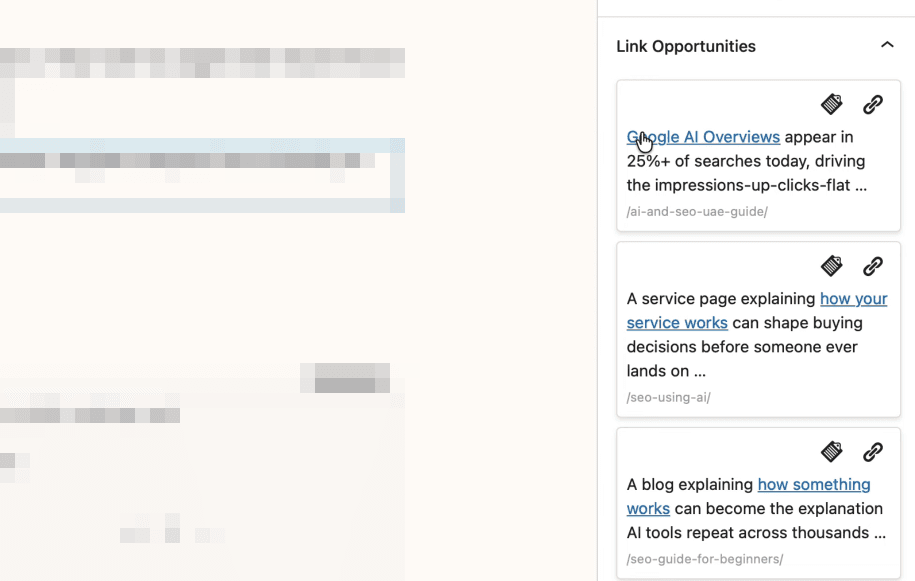
This feature can also be activated when you highlight any phrase in your content. Once you do that, Rank Math will start looking for any relevant post that can link to that phrase.
The second panel is the Related Posts tool. This one may not be as important, but it is still useful. It shows you all the posts related to the content you are editing. You can simply copy the URL of any relevant post and link it in your content.
This is useful too because it helps you quickly see the posts that match the content you are working on, instead of doing the usual manual search with keywords just to find related posts.
Utilize the internal links reports to find and fix orphaned/faulty content
In this review of AI Link Genius, the internal links report feature can be found in the Posts section of the tool.
This area gives you a list of all the posts on your site, along with data such as the number of internal links, external links, and incoming links pointing to each post. It also includes additional data like the SEO score managed by Rank Math.
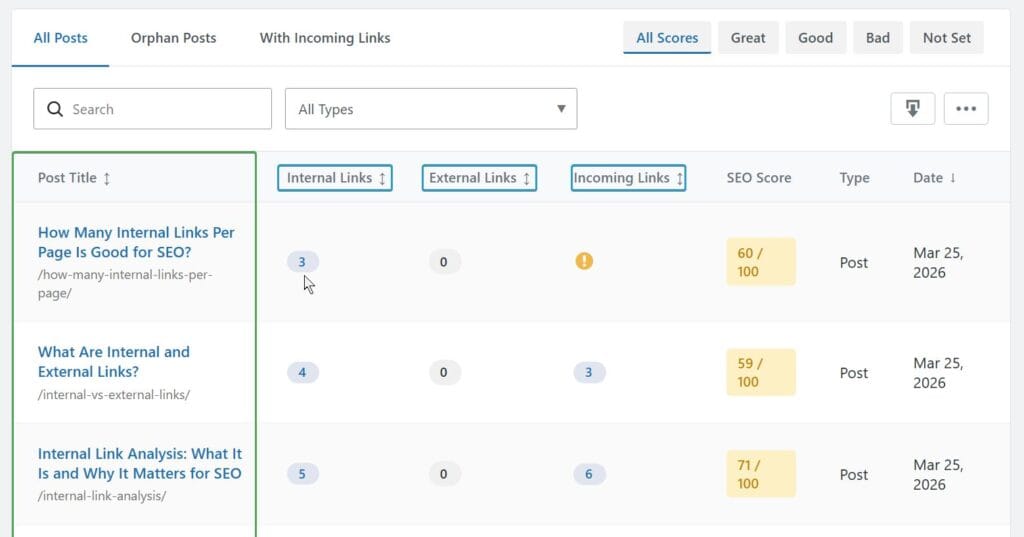
From this report, you can see the number of outgoing internal links for each post. The same applies to external links and incoming internal links.
This is a good feature because it helps you quickly identify pages that lack proper internal linking. From here, you can find such content and improve it by adding relevant internal links.
Once identified, you can go ahead and fix them, saving your site from weak structure and poor link distribution.
Utilize the internal links analysis to find links that are used for each page
When you click on any post listed in the internal links report, you gain access to detailed link analysis.
By clicking on the link categories such as internal links, external links, or incoming links, you will see the exact URLs and anchor texts used.
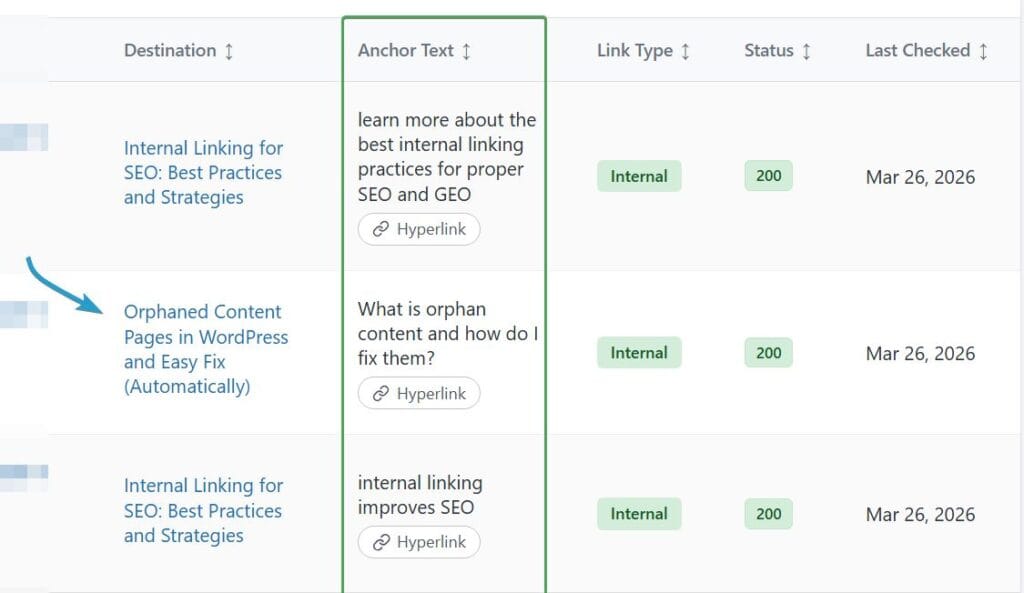
This means the tool does not just show link counts, but the actual links themselves.
One key advantage of this feature is that, unlike many dedicated internal linking tools, it allows you to edit links directly from this section.
You can click “Edit” and change the URL or the anchor text without leaving the interface.
So if you have been looking for a way to find and manage internal links on your content or links pointing to a specific page, this feature handles it efficiently.
Use auto-linking to build hyperlinks
Auto-linking simply means converting specified keywords and URLs into hyperlinks. This is useful when you need to link certain keywords across your site automatically.
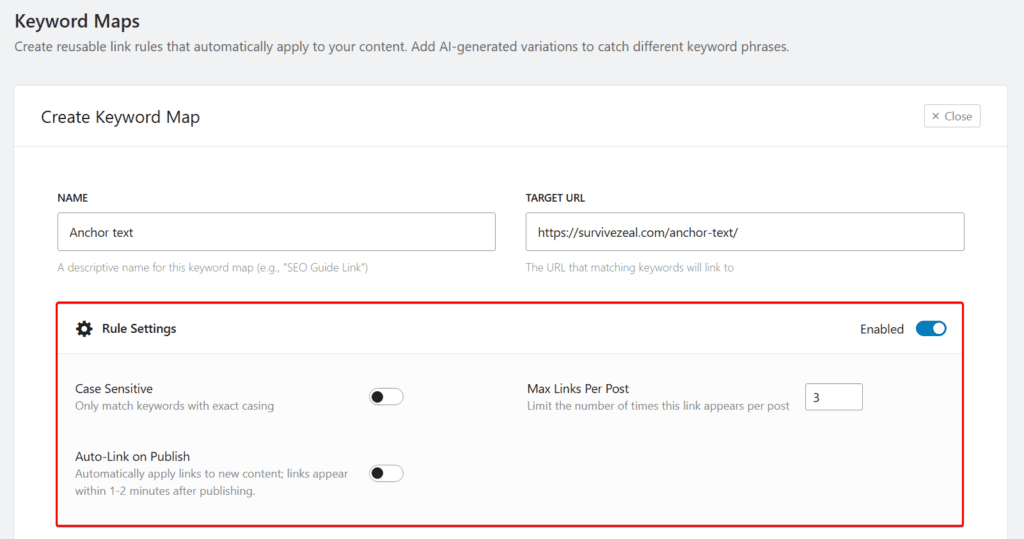
To access this feature, navigate to the Keyword Maps section of the AI Link Genius module. There, you can enter a particular keyword alongside a target URL you want it to link to. You can also set some rules, such as turning on the case-sensitive option, specifying the maximum number of times the link should appear in a post, and deciding whether the automation should apply whenever you publish new content.
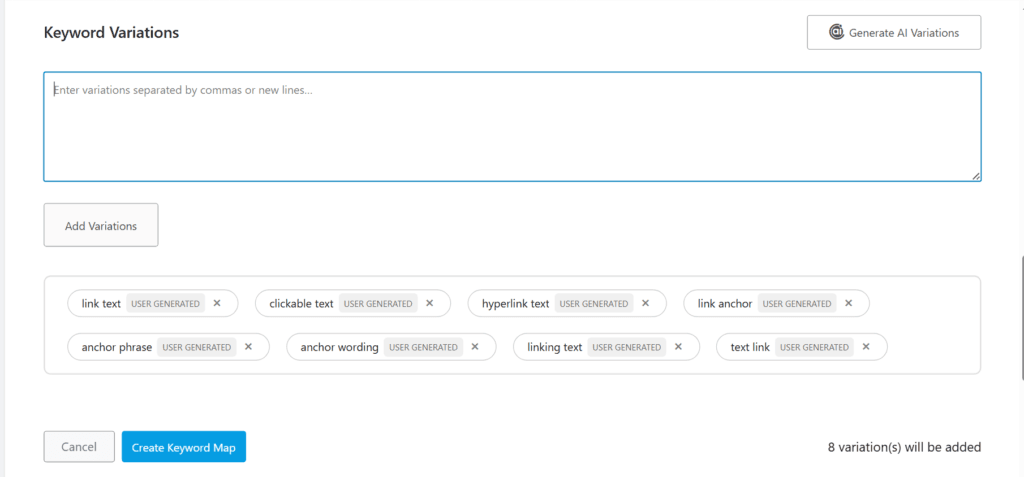
You can also add keyword variations for the main keyword. This helps you cover more related terms. Rank Math also gives you the option to use AI to generate more of these variations.
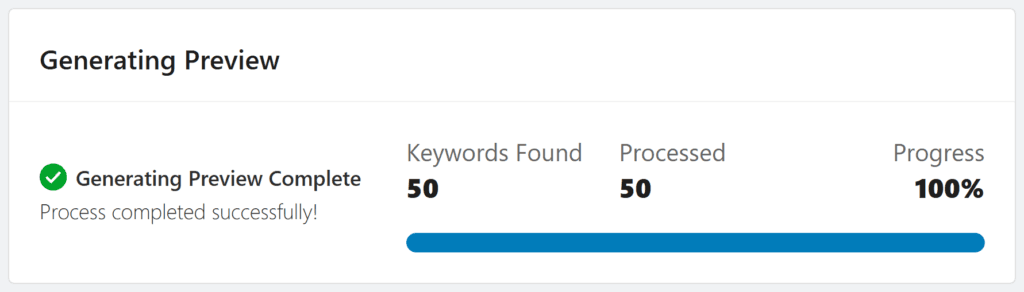
Once you are done with these steps, just click Create Keyword Map, and AI Link Genius will scan your posts and insert links where matches are found, while following the rules you have set.
There is also a rollback option, which is important in case you want to undo the mass linking you have already applied.
Overall, this is a nice automation feature to have, especially since you can set it to keep running even on future content.
Use search and replace to change old links, URLs or anchors
Another way to automate internal linking using AI Link Genius is by using the search and replace feature to update old links, URLs, or anchor texts.
Whenever a link changes or you need to update anchor text, doing it manually is not effective. This is where the bulk updates feature comes in. It helps you replace outdated data, so your content stays up to date.
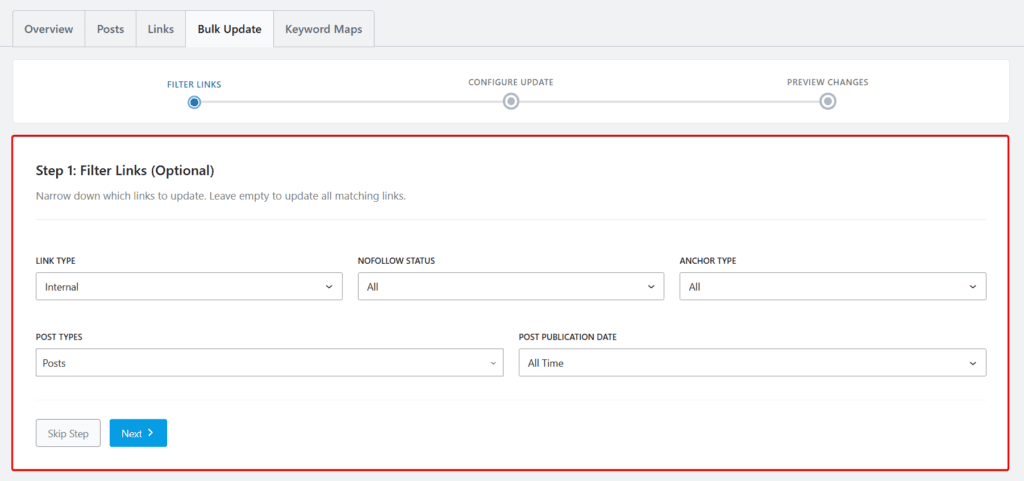
AI Link Genius provides advanced filtering for this process. To start, go to the Bulk Updates section. From there, you can filter the information you want to change, which helps you narrow down what to update. Leaving it empty will match all data.
After applying your filters, click Next, and you will be able to define what to update and set your replace rules.
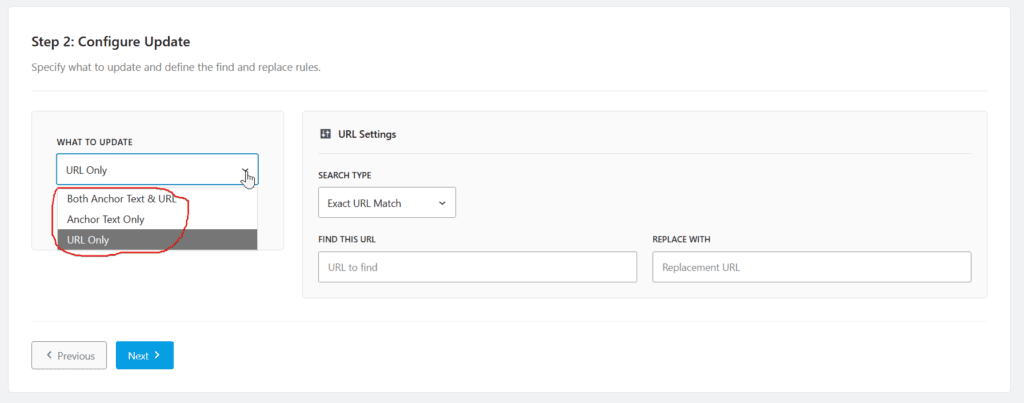
For example, you can choose to replace:
- URL only
- Anchor text only
- Both anchor text and URL
The option you choose depends on what you are trying to change. If it is just anchor text, use the anchor text option. If it is only the URL, use the URL option. If it is both, then select the combined option.
Whichever option you choose, you can still apply advanced filtering to make sure you get accurate results. For URL replacements, you can select exact match, partial match, or domain match. For anchor text, you can also choose exact match, partial match, or even a regex pattern.
After specifying the old data and the new data you want to replace it with, click Next, and the plugin will handle the replacement for you.
This is not just a time-saving feature. It also helps ensure that your site always has the correct URLs, anchor texts, and links across your content.
Internal linking best practices for SEO
Here is a summary of the best practices to follow when doing internal linking:
- Build your content around a central hub: Create a main page for an important topic, then build related articles around it. Link the pages together so they support one another and make the topic easier to navigate.
- Send more page authority to your most important pages: Use internal links to pass more value to the pages that matter most. These could be your pillar pages, money pages, or pages you want to rank higher.
- Link your important pages first with optimized anchors: When adding internal links, place the most important ones earlier in the content before other links. Use anchor texts that clearly describe the page you are linking to.
- Add links only where they make sense: Do not add internal links just to increase the number. Place them where they are relevant and actually help the reader.
- Use the right link attribute: Most internal links should be follow links, but in some cases, you may need to control how a link is treated based on its purpose.
- Avoid using one anchor text for different pages: Do not use the same anchor text to point to multiple pages. Keep each anchor clear so every page has its own meaning.
- Link from old relevant pages to your new pages: Go back to older related posts and add links to new content so it can get discovered faster and gain support.
- Fix orphan content, broken links, and 404 errors: Make sure important pages are not left without internal links. Also fix broken links so users and crawlers can move through your site properly.
- Use an internal linking tool to speed up the process: As your site grows, manual linking becomes harder. Tools like AI Link Genius help you find opportunities and handle repetitive tasks.
- Track your internal links and adjust when needed: Review your internal link reports regularly and improve your structure based on what you find.
You can dig deeper into the SEO best practices for internal linking.
Conclusion
Internal linking does not have to be stressful or time-consuming, even as your site grows. What starts as something simple can quickly become difficult to manage when your content begins to scale.
That is where a tool like AI Link Genius comes in. Instead of relying fully on manual effort, you now have a system that helps you find opportunities, fix issues, and manage your internal links more efficiently.
From link audits and suggestions to reports, auto-linking, and bulk updates, it covers the key areas you need to keep your internal linking structure strong and up to date.
At the end of the day, the goal is simple. Make your content easier to navigate, help your important pages stand out, and keep your linking structure clean as your site grows.
If you are already using Rank Math, then this is something worth exploring before looking elsewhere.
FAQs
How does AI Link Genius compare with dedicated internal linking plugins?
AI Link Genius already has the core features. This includes internal link suggestions, internal link reports and analysis, auto-linking, and search and replace.
Let’s be sincere here. When it comes to internal link reports or audits, Rank Math performs better and gives more accurate data than the best internal linking plugins, even the ones on our top lists. It is just a module, yet it delivers at that level.
Looking at it from a value perspective, it is the most affordable because you are not paying for internal linking alone.
How does it compare with Link Whisper?
Link Whisper has been around for a long time.
But let’s rate them without being biased. Rank Math should be your first choice because it is a need, while Link Whisper as a dedicated tool is a want. Rank Math already handles your SEO and now gives you internal linking, so it naturally comes first.
We had already compared Rank Math SEO with Link Whisper before the Link Genius feature was added. With this addition, the SEO plugin now has more ground in the competition.
What’s the stage of AI in automating internal linking in 2026?
Despite having the power of large language models since 2022, and all the improvements expected over the years, internal linking automation is still not perfect.
The main method these tools use to automate internal linking is link suggestions. And the truth is, it still produces poor results some of the time.
So AI is not a replacement. It is an assistant.
Even with automation features, including the ones in AI Link Genius, there are still issues like wrong matches and hallucinations. So you still need to review what the tool gives you.
Overall, AI helps speed things up, but it is not yet at the point where you can leave everything to it.
You can learn more about AI-powered internal linking.