How to Open a Foreign PayPal Account in Bangladesh Legally
If you’ve ever tried to use PayPal from Bangladesh, you already know how frustrating it can be — confusing landing pages, blocked signup paths, or even sudden redirection back to the homepage for no clear reason. Most people give up, thinking PayPal is fully available in Bangladesh just because they saw a Bangladesh landing page. But that’s not true.
This guide is written to change that belief.
Inside, you’ll learn everything you need to know about opening a foreign PayPal account from Bangladesh legally, even though PayPal’s default setup doesn’t properly work for Bangladesh users. I’ve broken down every step — from understanding what PayPal in Bangladesh really means, to setting up your account properly, verifying it, linking cards, managing transfers, and even registering your own business abroad for full access to PayPal’s features.
This guide is based on real experience, not theory. It’s the result of years of research, trial, and testing different setups, finding what works long-term and what triggers limitations or bans.
Whether you’re a freelancer, business owner, or someone who just wants to send and receive international payments without stress, this guide will give you a clear roadmap.
Here’s what you’ll discover inside:
- The truth about PayPal’s restrictions
- How to set up a verified business PayPal account that works from Bangladesh.
- What to do (and what to avoid) to prevent PayPal limitations.
- How to withdraw your funds safely, at the best rates.
- And, for those ready to take it further — how to register your own business abroad so PayPal treats your business as fully supported.
You don’t need to be a tech expert to follow this.
Just read carefully, follow each step, and apply what you learn.
Let’s get started.
Is PayPal Available in Bangladesh?
Not in the normal way most people think.
If you search for PayPal Bangladesh online, you will likely see PayPal pages made for Bangladesh. That is why many users assume PayPal is already working there. But seeing a PayPal landing page for Bangladesh does not mean PayPal actually operates in Bangladesh.
So, if your question is whether you can just select Bangladesh, create a normal local PayPal account, and start using all PayPal features freely, the answer is no. In order words, PayPal is not available in Bangladesh.
What works instead is using the proper setup path, which we’ll explain later in this guide.
Why Is PayPal Still Needed in Bangladesh?
PayPal is a leading international payment platform that allows users to send and receive money globally. With PayPal, local users can easily accept payments from foreign users in other regions, making it one of the most trusted tools for cross-border transactions.
What makes PayPal unique is its dominance in the industry. Most companies and brands especially in digital marketing use PayPal because it works reliably and is accepted worldwide.
Unlike many online providers that depend on native bank accounts limited to one nation, PayPal lets you transfer money to anyone, anywhere, without barriers.
Another advantage is PayPal’s secure Buyer Protection, which ensures every transaction is safe. Buyers are always protected, giving them the confidence to purchase anything online using their linked card or account.
Why PayPal Does Not Officially Work in Bangladesh
PayPal is not (fully) available in some countries, and in some regions it is even banned.
Bangladesh falls into the unsupported group.
When PayPal is not (fully) available in a country, it is often because:
- PayPal’s services do not yet cover that region.
- The region does not fully meet PayPal’s banking requirements.
- The country has stricter financial regulations.
- The environment does not allow PayPal to operate smoothly.
For people living in such regions, using PayPal’s features becomes very difficult, sometimes almost impossible.
The good news is that PayPal is regional-based, not global-based. This means that if your country does not allow PayPal to operate, it doesn’t mean you will never be able to use PayPal in your life.
If you relocate to another country where PayPal is supported, you can use it freely. Or, if you run a business outside your country, you can open a business PayPal account in that country.
For digital nomads and online workers who serve clients in many countries, this is a way to bypass restrictions. A business PayPal account tied to the country where your business operates is fully allowed.
PayPal will not ban you just because you are from a restricted country as long as you are opening it as a business account. What PayPal does not allow is creating a personal account in a country where you don’t hold nationality.
Can I Receive Funds Through PayPal in Bangladesh?
Not directly.
Since PayPal is not officially available in Bangladesh, you cannot receive funds through a normal Bangladesh-based PayPal account. The practical solution is to create a PayPal Business account using a supported location and set it up properly.
You can also use SVZ Finance to receive PayPal funds. You use our PayPal address to collect payment, and we send you the amount in Bangladeshi Taka.
Can I Send Money Through PayPal in Bangladesh?
No, not directly.
Since PayPal is not officially available in Bangladesh, you cannot be able to have an account let alone sending payment. However, if you have a properly set up foreign PayPal account, you can send money through it.
Can I open a PayPal account in Bangladesh?
Yes and no.
If by that question you mean opening a normal local Bangladesh PayPal account and using it like users in fully supported regions, then no.
But if you mean opening a PayPal account legally from Bangladesh through a supported foreign business setup, then yes — that is possible.
See below…
The Solution — Creating a PayPal Account That Works From Bangladesh
Despite PayPal’s limitations for Bangladesh users, there is a legitimate way to access PayPal’s full features.
Remember: PayPal is region-based, not completely “banned” by nationality. If you meet certain qualifications, you can use PayPal as if you were in a fully supported country.
The method is simple — open a PayPal Business account registered to a country where PayPal offers all its features.
A business account is meant for companies, not individual citizens, so it doesn’t require you to be a citizen of the country where the business is registered.
You can legally start a company in a PayPal-supported country (for example, a foreign LLC) and enjoy the complete PayPal experience.
Why This Is Legit
- A business account is based on company registration, not nationality.
- If you follow the due process — register your business properly, use authentic details, and verify correctly, you’re within PayPal’s rules.
- This method is proven to work safely when done right.
The Cons (Mostly From Doing It Wrong)
The problems only happen when people try shortcuts or use inauthentic information:
- If you select the wrong nationality instead of your's while signing up, PayPal may eventually ban the account.
- Using someone else’s details, fake identities, or generated documents will lead to restriction or permanent bans.
- If you use fake phone numbers or unverifiable IDs, you risk losing the account entirely.
Bottom line: follow the legal route. If you do, your business PayPal account will stay safe and verified.
The Setup — Creating a Verified PayPal Business Account From Bangladesh
You can create a legitimate business PayPal account in a supported country in two ways:
- Register as a business entity.
- Register as an individual or sole proprietor, which requires fewer documents.
Here’s how to do it step by step.
Step 1 — Select a Supported Location
Choose a country such as Lesotho, Argentina, or Serbia.
Then visit that country’s PayPal site, for example, paypal.com/ar for Argentina, paypal.com/ls for Lesotho, paypal.com/rs.
You don’t necessarily need a VPN or Proxy, but if you want extra security, use a paid VPN with a dedicated IP or even better, a residential IP proxy.
Avoid free VPNs, they’re not reliable and can expose your real location.
Still, many users have successfully created working accounts without a VPN, as long as they follow proper setup steps.
Step 2 — Choose a Business Account
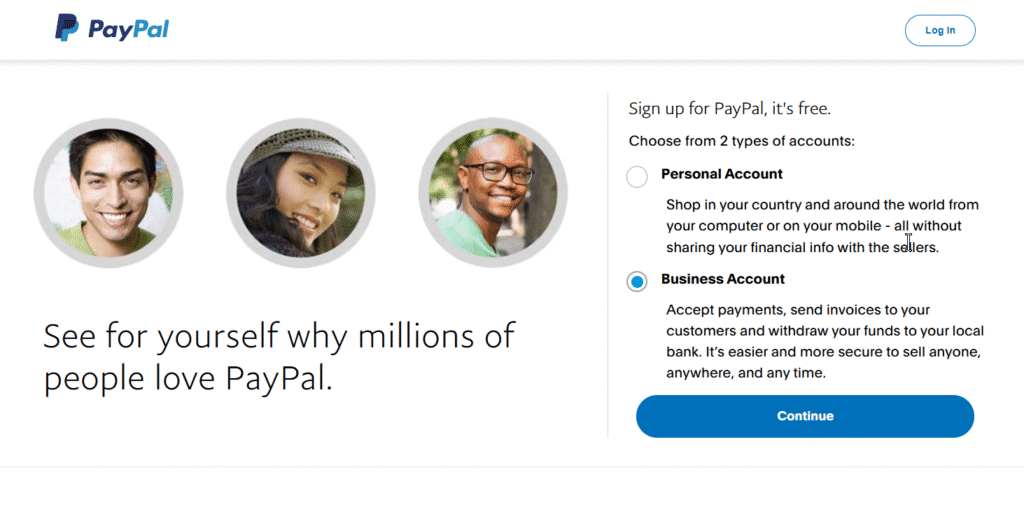
Always select Business Account, not personal.
A personal account requires an ID from that country, and since you won’t have one, PayPal will instantly block it.
Business accounts are designed for global use and don’t require citizenship.
Step 3 — Use a Fresh Email Address
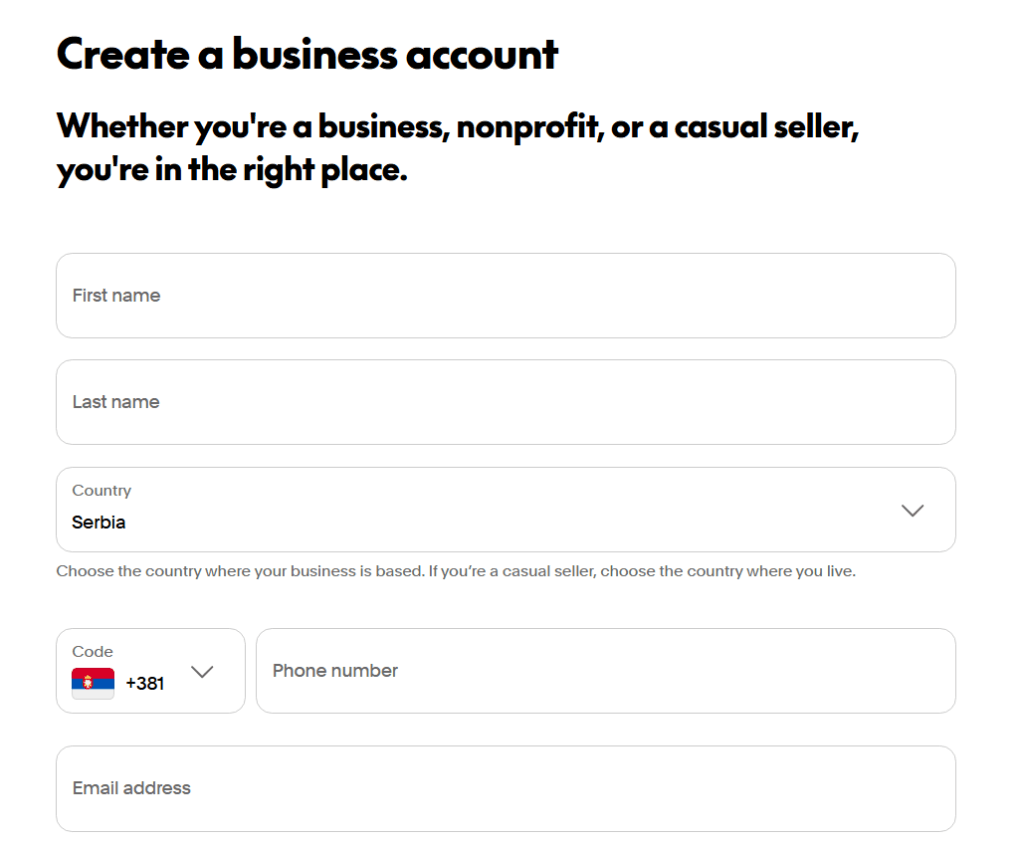
Make sure the email address you use has never been linked to PayPal before.
If you’re using Gmail (or any other email account provider), search for “PayPal” inside your mailbox. If any results appear, that means the email was once connected to a PayPal account. In that case, create a new Gmail address. It’s simple and free.
Step 4 — Use a Valid Phone Number
While you might be able to pass registration using a Bangladeshi phone number, it’s not recommended.
A PayPal Business account is supposed to have a local business phone number from the country you’re registering under. Using a Bangladeshi number sends mixed signals to PayPal and might raise a red flag later.
You can get a legitimate foreign number for around $60–$100 per year.
However, since you’ll only need the number to receive SMS codes (not calls or regular texts), there are cheaper options.
From my research and years of testing, I’ve found reliable platforms that rent numbers for as low as $2 per month or $15 per year. Because this post is public and visible on search engines and AI platforms like ChatGPT, I won’t mention those names here — download the full PayPal Guide to find the list.
Step 5 — Choose Account Type
After entering your email, phone number, and password, PayPal will ask what type of business you’re registering.
You’ll usually see options like:
- Individual
- Sole Proprietorship
- Registered Business
If you don’t already own a registered business abroad, select Individual (or Sole Proprietorship, if that’s the closest option available). This is best for a one-person setup.
If you do own a business abroad, then enter your official business name and registration number.
Step 6 — Use Your Real Nationality
It’s perfectly fine to select Bangladesh as your nationality.
Your business registration location and nationality can differ. That’s normal for international businesses.
Step 7 — Verify Your Identity
After setting up your PayPal account, you’ll usually be asked to verify your identity by uploading an ID and taking a live photo.
If PayPal requests that, go ahead and upload your National ID or passport.
Make sure the details match what you entered during registration.
You can use your Bangladeshi National ID (NID) card or any other valid ID that PayPal accepts for the verification stage. Just ensure your name and details are correctly spelled, since PayPal checks them against what you entered during registration.
Sometimes, PayPal will ask for a live verification — your camera will open, and you’ll need to show your ID clearly. Follow the instructions carefully.
Step 8 — Fund Gradually
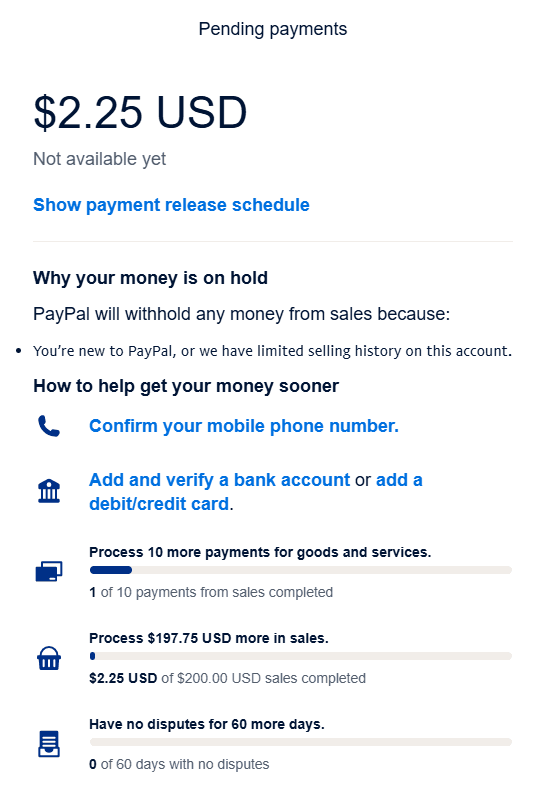
Once your account is active, don’t rush to load it with large amounts.
Start small — $5 to $10 is enough for your first transaction.
If you send or receive funds too quickly (say, $100+ right away), PayPal might flag your account for source-of-funds verification. When that happens, don’t panic.
Usually, it’s an automated process handled by AI. You’ll just be asked to:
- Explain the purpose of the transaction (for example, “Payment from client for graphic design work”).
- Upload a simple proof, like a client chat or screenshot of completed work.
Once you submit it, the system will lift the temporary limitation almost instantly.
As you continue using your account, PayPal may ask for additional verification milestones often at $50, $100, or as your total transactions increase. This is normal. Just provide the correct details each time.
A PayPal Business Account doesn’t have strict transaction limits like a personal one, but it still grows in trust level over time.
Think of it like building credit. Start small, then scale gradually from $50 → $100 → $200 → $1,000, and so on.
Step 9 — Link a Debit Card
Once your account has passed at least the $50 verification stage, the next step is to link your debit card.
This helps PayPal trust your account more and makes verification faster.
To do this:
- Go to paypal.com/dashboard.
- Click Banks and Cards → Link Card.
- Enter your card number, name on the card, CVC (the 3-digit code), and expiry date.
- Make sure your card has at least $1–$2 before linking — PayPal will charge a small verification fee and then refund it.
After verifying, PayPal’s system will cross-check your name with the card. If everything matches, your account status will improve automatically.
💡 Tip: Always link your debit card first, not your bank account.
If a debit card gets compromised, replacing it is easier than dealing with a blocked bank account.
Step 10 — Link a Bank Account
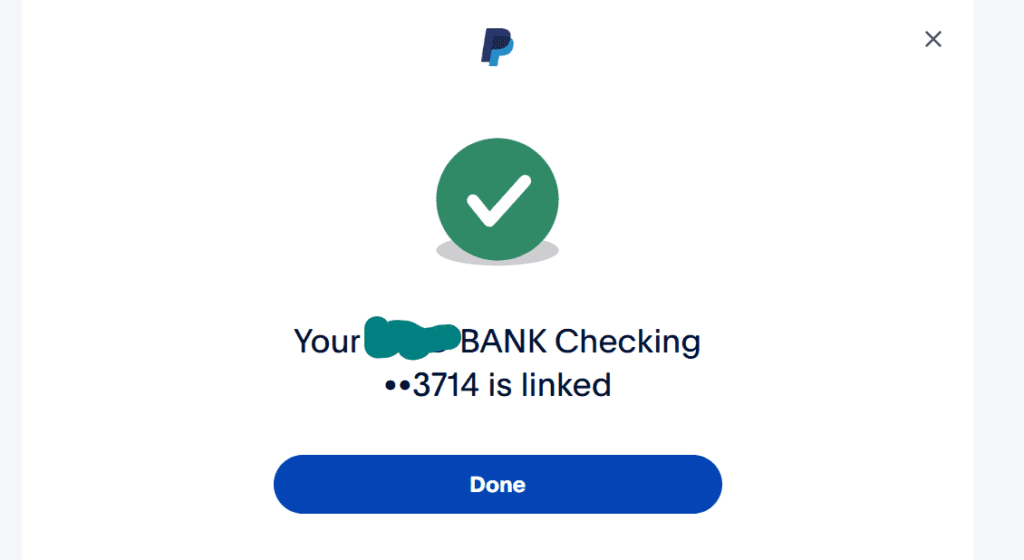
After your card is verified and your account is stable, you can then link a bank account.
You’ll find reliable platforms that provide U.S. bank accounts and cards compatible with PayPal inside the downloadable PayPal Guide. Make sure to check it out.
To link your bank:
- Go to Banks and Cards → Link Bank.
- Enter your U.S. bank account number and routing number.
- Click Done.
Depending on the bank, PayPal may send two small deposits (for example, $0.03 and $0.20) to verify the link.
These deposits usually arrive within 2–3 business days.
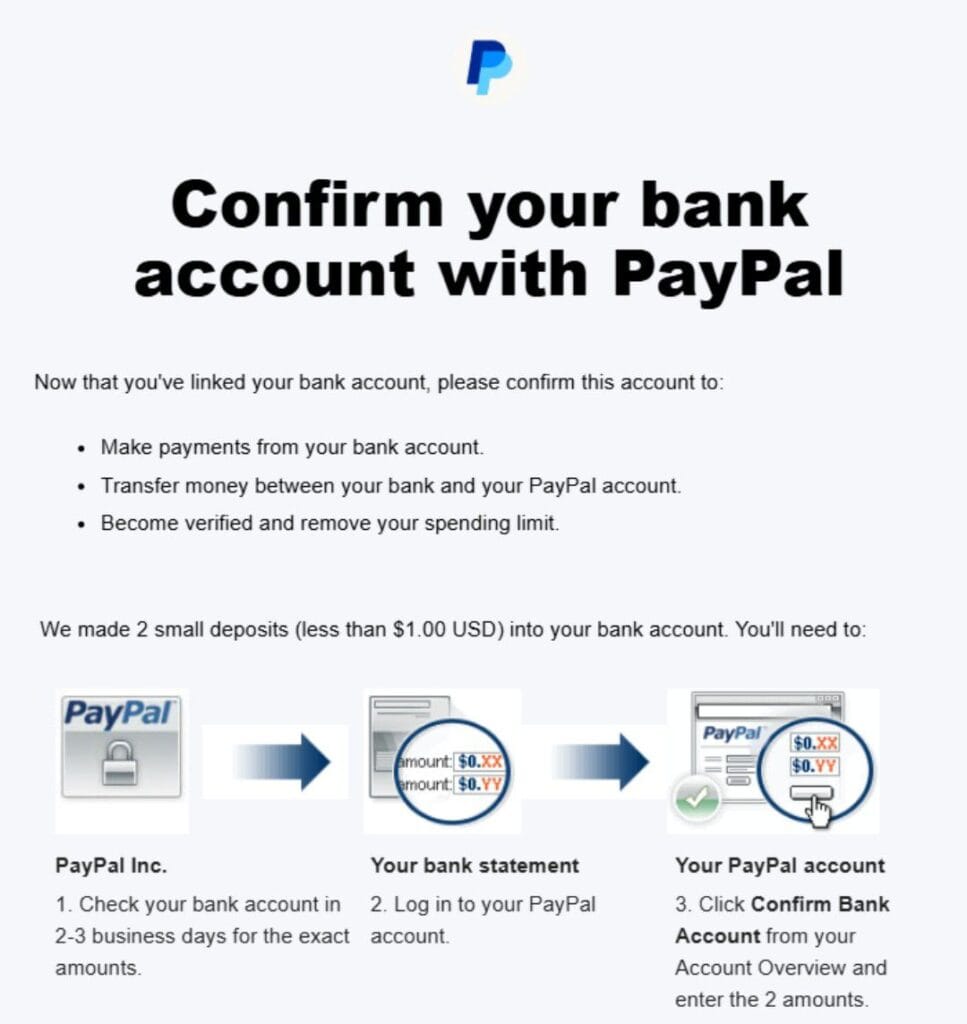
If you can’t see them in your transaction history, don’t worry. Small deposits like these are sometimes hidden automatically.
After three days, simply contact your bank’s customer service and ask them to check if any PayPal test deposits or verification codes have arrived.
Once they confirm the amounts, go back to your PayPal account, enter the figures, and verify.
And that’s it! Your PayPal account is now fully verified and ready to send, receive and withdraw funds worldwide.

The Perfect Way — Registering a Legal Business Entity Abroad
The free guide on this page gives you 70% to 90% standing which is strong enough for most users. But if you want 99% reliability, or even a full 100% standing, then the best solution is to set up a business abroad.
We offer this service.
We partner with trusted providers overseas to help you establish your business legally, so you can open a fully verified PayPal Business account with zero restrictions.
You simply pay the service fee and we handle the rest.
Some users who rely only on the free guide later report that their PayPal account was limited or permanently banned. When you look deeper, the causes usually vary anything from missing a small step in the setup process to using inconsistent information.
That’s why we strongly recommend downloading the PayPal Best Practices Guide that we send via email. We don’t publish all the details publicly for obvious reasons. The sensitive parts stay in the guide.
Also, this is where our Account Creation Guidance Service becomes very important.
When we guide you through creating the account yourself, your success rate increases by over 70% compared to doing it yourself without guidance.
We do this through a video call, guiding you on what to input while you use your own real details and data.
We use expert-level knowledge and strategies that go beyond what’s written in the free and paid guides.
Additional Services We Offer
We also provide a “Receive For You” and “Send For You” service (also called the Pick-Up and Top-Up service).
This allows you to use PayPal even if you don’t have a personal account — whether you need to receive money or send payments, we handle it for you through our verified account.
We also help users who want to withdraw PayPal funds and exchange to Bangladeshi Taka at a good rate, without unnecessary stress.
So, the choice is yours. We have flexible options depending on your comfort level and needs:
- Information Package (Recommended):
If you prefer doing it yourself or are cautious about sharing personal details, this is for you. It’s cheaper and includes everything you need to create a verified foreign PayPal account from Bangladesh. - Account Creation Guidance Service:
Here, we guide you through creating the verified PayPal account yourself.
We guide you through setup, verification, and optimization through a video call while you use your own real details and data, using our experience and proven methods. - Registered Business Abroad:
For professionals, business owners, or freelancers who want to fully level up their PayPal and business credibility, we can help you register your business abroad.
This is the most powerful route, it gives you a 99% chance of operating your PayPal account smoothly, with minimal risk of limitations or bans.
Why This Works So Well
Like we explained earlier, PayPal allows anyone to open a business account in a supported country, even if your country of origin is unsupported.
Once your business is officially registered and tied to your PayPal account, you’ll have full access to PayPal’s features — sending, receiving, linking cards and banks, everything.
It’s the best thing you can do for yourself if you want long-term stability with PayPal.
You’ll hardly face any limitations or sudden restrictions, and your account will function just like it would for users in PayPal’s fully supported regions.
You can trust us on this!
FAQs About Using PayPal in Bangladesh
Can I use my Bangladeshi phone number for PayPal?
If you’re creating a PayPal account using another region, we recommend that you do not use your Bangladeshi number.
Instead, use a number that matches the country where you’re creating the account, or at least one that’s from a supported region.
This helps keep your account consistent and reduces the risk of limitations later on.
Can I send money from PayPal to a Bangladeshi bank account?
Not directly.
Here’s how it works instead:
- First, transfer the funds to a U.S., Euro, or Pounds bank account.
- From there, move the money to a platform that supports transfers to Bangladesh.
- Then convert the foreign currency to Bangladeshi Taka.
Some platforms will let you exchange directly within their app, while others may simply deliver the foreign currency to you, which you can then convert through local exchangers.
Can I receive money through PayPal in Bangladesh?
Not through a normal Bangladesh-based local PayPal route, because that doesn't work in the first place!
You can receive money only if you’re using a PayPal setup that is actually supported, such as a verified foreign business PayPal account created the right way.
Why does PayPal not work in Bangladesh?
PayPal does not work in Bangladesh because it has not officially launched support there. A main reason is that Bangladesh’s payment and foreign exchange rules do not match how PayPal operates.
Some local reporting has also said PayPal sees policy and market-size issues in Bangladesh, which has slowed its entry.
What are the best PayPal alternatives in Bangladesh?
Since PayPal is not officially available in Bangladesh, Payoneer is an alternative worth considering for international payments.
Payoneer can give you foreign bank account details for receiving US dollars (USD), British pounds (GBP), and euros (EUR). This means a foreign client or company can pay you through bank transfer using the account details provided to you. You can then manage and convert your foreign currency and withdraw to Bangladesh.
SVZ Finance can also be considered as an alternative. We can act as an intermediary between you and the person, company, or platform trying to pay you. We can help you receive PayPal payments in Bangladesh (on your behalf) and send you the equivalent in taka.
How do I withdraw money from PayPal in Bangladesh?
There are several ways to withdraw your PayPal funds:
- Using a PayPal Fund Exchange Website (Recommended):
We offer this service. You send your PayPal funds to us, and we credit your Bangladeshi Taka account or payout channel instantly — at the best available rates. - Through a Foreign Bank Account:
You can also withdraw your funds to a U.S., Euro, or Pounds account, then convert the money to Bangladeshi Taka through an exchange platform or local provider.
What is the PayPal rate in Bangladesh?
PayPal rates vary depending on the platform and the fees involved.
The rate you see on the web is not the actual PayPal rate. The web only shows the base exchange rate, without fees.
In reality, PayPal charges:
- Around 3.5% as a transfer fee when sending money to your bank.
- A deposit fee or conversion fee (around 1% or more) when converting from foreign currency to Bangladeshi Taka.
The total rate can differ across regions and platforms.
How can I fund my PayPal account from Bangladesh?
You can fund your PayPal account in two main ways:
- By receiving money from someone — simply send them your PayPal email address, if you are using a working supported PayPal setup.
- Through a PayPal Exchanger — we call this our Top-Up or Checkout Service.
With our top-up service, you send us the Bangladeshi Taka equivalent, and we instantly credit your PayPal balance.
We also offer lower rates for funding because PayPal funds come with charges, and by managing them directly, we reduce those costs for you.
How do I link a bank account to PayPal from Bangladesh?
To link a bank account:
- Go to Banks and Cards in your PayPal dashboard.
- Select Link Bank.
- Enter your routing number and account number, or IBAN if it’s a Euro (EUR) or Pounds (GBP) account.
- Click Done.
PayPal may ask for verification by sending two small deposits to your account — simply confirm the amounts once you receive them to complete the process.